All technical resources for the Fairino FR series in one place: datasheets, user manuals, 3D models, free SDKs and certificates. Engineering something specific? Ask us.
How to reach the Fairino web interface (WebApp) and the default login. For security, change the password after your first login.
The robot control port (button box interface) has the default IP address 192.168.58.2. Connect it to your computer with a network cable, set your computer to 192.168.58.10 (same network segment), then open Google Chrome and go to 192.168.58.2 to reach the teach pendant / WebApp.
Open the connection guideThe default administrator account is username admin with password 123 (job number 111, full access). Other default roles exist as well, such as programmer (444), operator (555) and monitor (666). Change the default password after your first login.
Open the login guidePayload 3 kg, reach 622 mm, repeatability ±0.02 mm. Full specifications, load curve and pricing.
View specs & pricePayload 5 kg, reach 922 mm, repeatability ±0.02 mm. Full specifications, load curve and pricing.
View specs & priceCompare payload, reach and pricing across the full Fairino range on our products page.
Browse all modelsThe official FAIRINO brochure, certificates and download bundles in the documentation portal.
Open downloadsDownload the latest Fairino controller software and firmware releases, with the version history and release notes, from the official download portal. Keep your cobot on the newest version.
Get the latest softwarePayload 10 kg, reach 1400 mm, repeatability ±0.05 mm. Full specifications, load curve and pricing.
View specs & pricePayload 16 kg, reach 1034 mm, repeatability ±0.03 mm. Full specifications, load curve and pricing.
View specs & pricePayload 20 kg, reach 1854 mm, repeatability ±0.1 mm. Full specifications, load curve and pricing.
View specs & pricePayload 30 kg, reach 1403 mm, repeatability ±0.1 mm. Full specifications, load curve and pricing.
View specs & priceFR3-WMS, FR3-WML, FR5-WML and the FR3-C cleanroom model: hollow wrist and dedicated welding versions of the FR series, with specs and pricing per variant.
Compare variantsWhich certificate applies to which model: IP65, CE-EMC, CE-MD, functional safety, RoHS, NSF and explosion-proof, listed per FR model.
Open certificate matrixHow much a cobot can really lift depends on how far the centre of gravity of your tool sits from the flange. Pick a model below and you get its official payload curve straight from the FAIRINO user manual. The blue envelope is full performance, so it covers most trajectories. The red envelope is extended payload capacity, which needs time optimal mode with limited acceleration, or a smaller working range.
Choose a cobot to see its official payload curve. The horizontal axis is the centre of gravity offset of your tool and part measured from the flange, the vertical axis is the payload you can still carry at that offset.
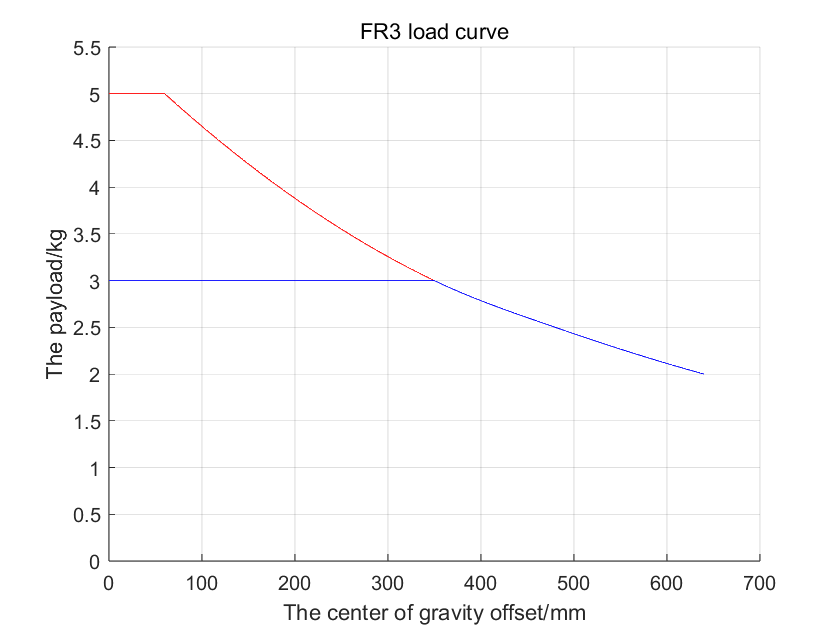
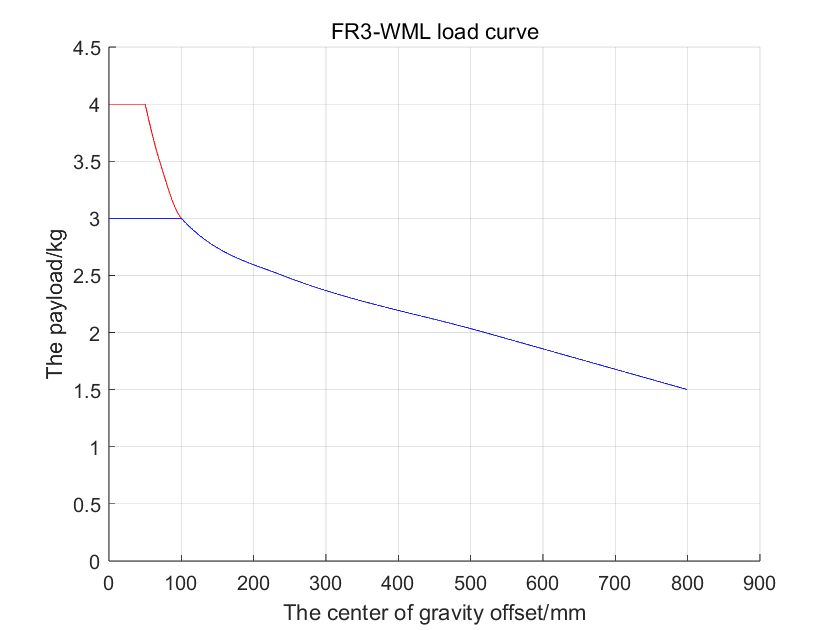
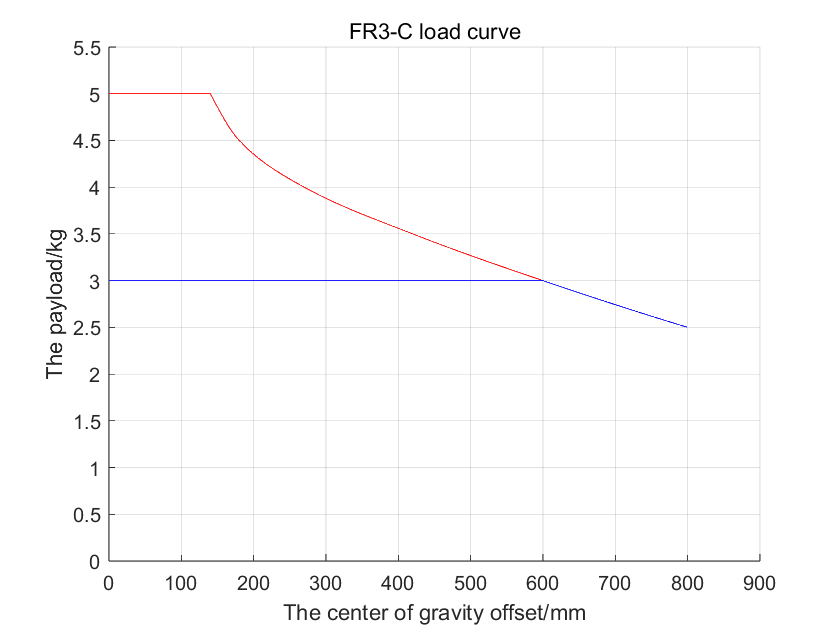
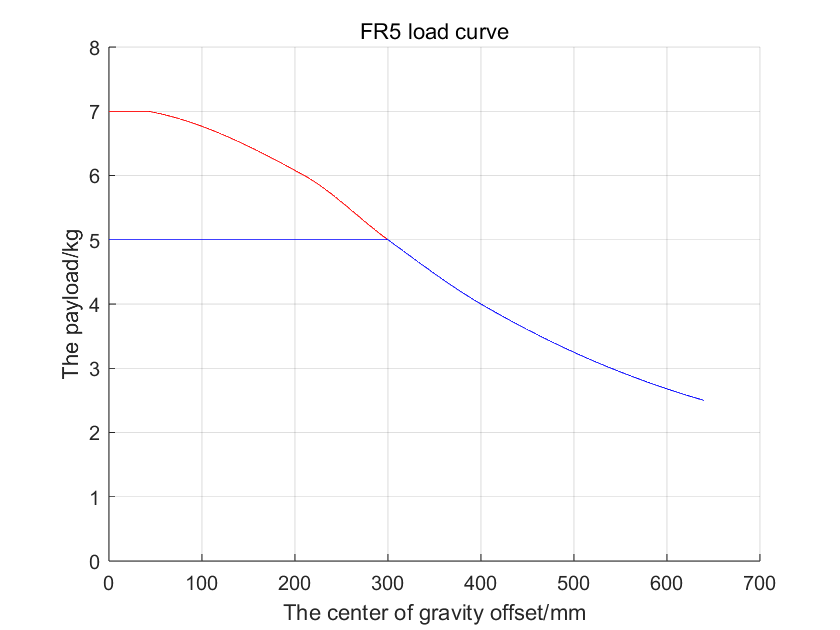
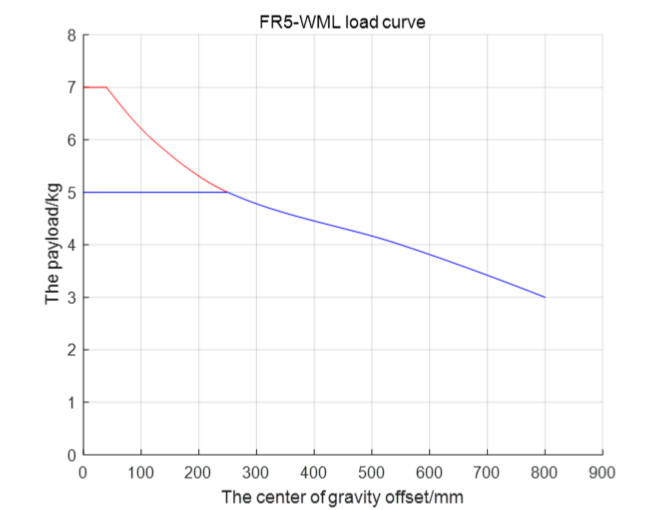
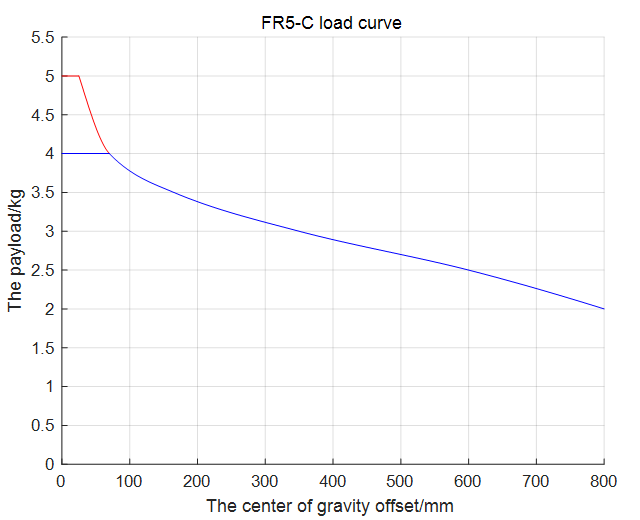
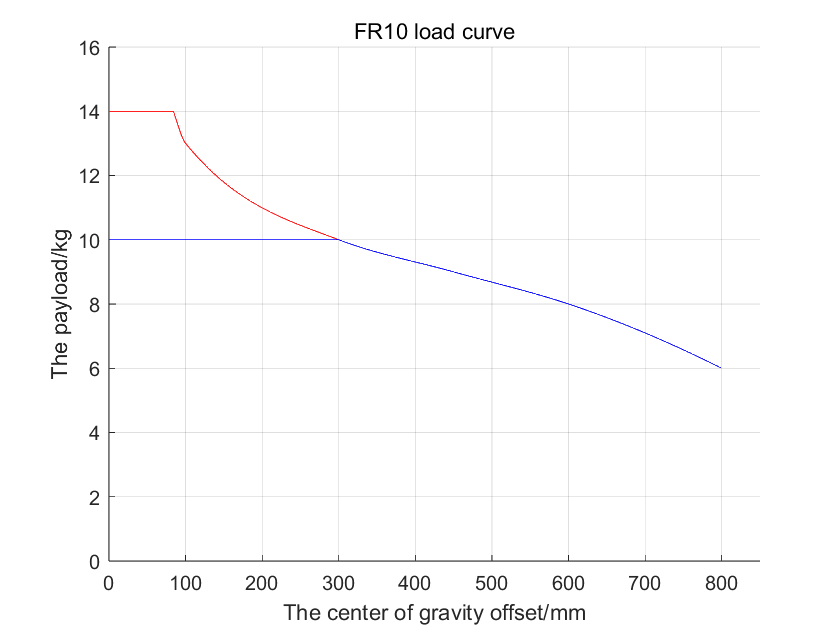
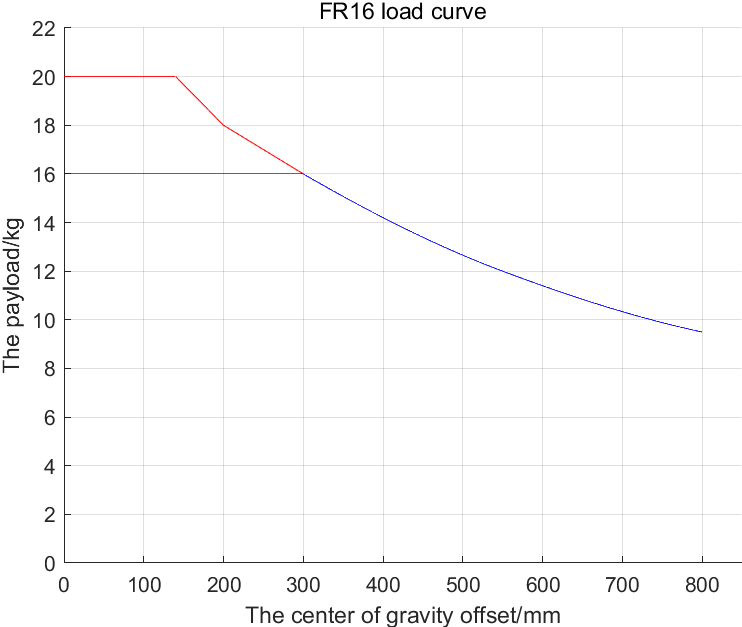
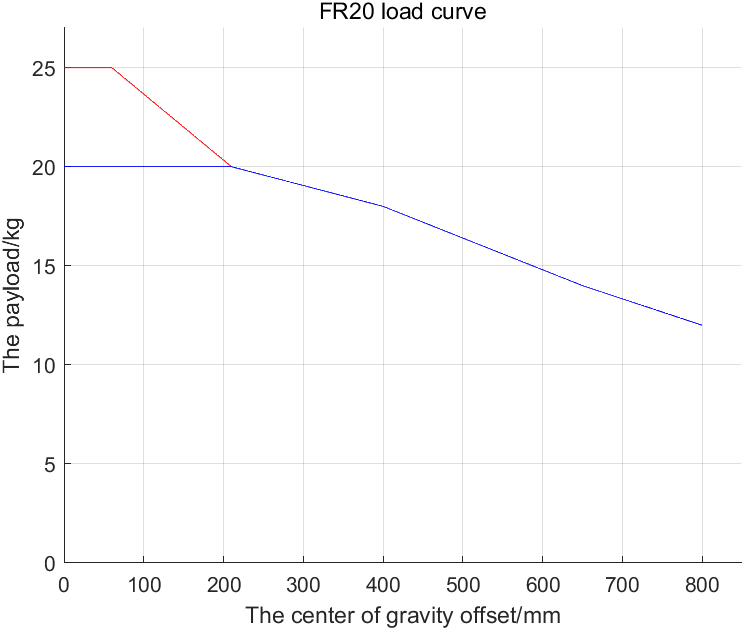
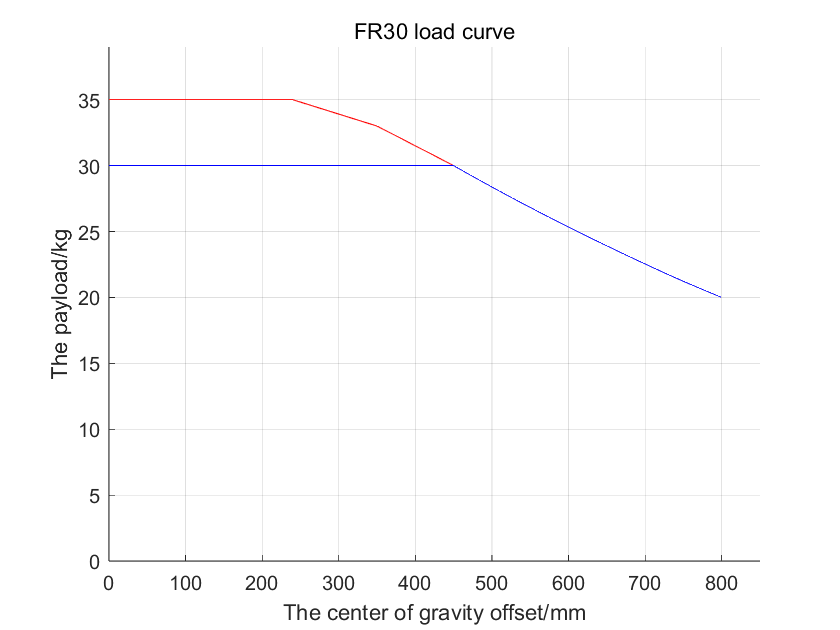
Full performance means friction compensation at coefficient 1 on every joint, collision level 10, 100% speed and 360 deg/s² acceleration in the web interface, with dynamics 2.0 enabled. Extended load capacity needs time optimal mode with the acceleration limit respected, or a reduced working range or speed. Curves come from the official FAIRINO user manual. Not sure which model fits your part and gripper? Send us the weight and the offset and we check it with you.
SolidWorks and STEP models of every FR cobot and controller, plus 2D CAD files and dimensional drawings for your cell design.
Open 3D modelsOfficial qualification and certification documents for the European market.
Open certificatesThe latest robot software releases and downloadable SDK packages.
Open softwareEverything in one place: manuals, downloads, SDKs and error codes.
Open portalOntology and dimensional drawings per model (FR3 to FR30): mounting pattern, working envelope and flange dimensions.
Open drawingsDWG files for the FR cobots, the 2 kW and 5 kW control boxes, teach pendant and button box.
Open 2D CADReference models used to re-establish the zero position after maintenance or a joint replacement, per FR model.
Open zero position modelsSTEP models of complete cells: CNC tending, palletizing, sorting and welding workstations, plus the envelope diagram.
Open STEP modelsThe official documentation covers every detail of the FR series. These are the chapters our customers use most:
Step-by-step: mount the arm, connect the control box, power on and enable the robot.
Open guideSwitch the control box digital inputs between NPN and PNP. Only the AC wide-voltage 2 kW box supports PNP (EX-24V = NPN, EX-0V = PNP); the DC and AC narrow-voltage boxes are NPN-only.
View wiring guideProgram your cobot from any browser: teaching points, motion instructions and running programs.
Open guideThe complete official manual: safety, installation, parameters, maintenance and error codes.
Open manualFree SDKs for Python, C++, C# and Java, with full API reference for every function.
Open SDK docsOfficial frcobot_ros and frcobot_ros2 packages, including MoveIt2 support.
Open guideReady-made application plug-ins for the WebApp, including the official Palletizer FRCap.
Open guideAutomate advanced logic directly on the controller with FR Lua programming scripts.
Open guideCollision detection, safe speed, safety I/O and safety planes. The chapter you need for your risk assessment under ISO 10218 and ISO/TS 15066.
Open safety chapterWiring and configuring end-effectors: electric grippers, vacuum, force sensor, tool I/O and the button box.
Open peripherals guideBuild programs by dragging blocks instead of writing code. No robot programmer needed to get a first application running.
Open guideModel complex logic as a node graph: branches, loops, parallel flows and events in the WebApp editor.
Open guideTeach, store and reuse points, and set up tool (TCP) and workpiece coordinate frames.
Open guideReady-made routines for palletizing, welding, gluing and machine tending, plus the process package settings behind them.
Open applicationsLet a PLC or PC start, stop and steer the robot, including the custom protocol slave mode for tight machine integration.
Open remote modeLook up an alarm code, find the cause and the fix. Start here before you call support, it often saves an hour.
Open error code listMounting positions, bolt patterns, cabling, working range and environmental limits for cell design.
Open installation chapterWhat changed in each controller software release, from V3.7 to the current V3.9.7. Updates are free for life.
Open changelogEvery Fairino SDK is free and license-free. Pick your language, connect over Modbus TCP, Profinet or EtherCAT, or drive the cobot from ROS. Direct links to the official API references:
The fastest way to script a Fairino cobot. Full API reference for motion, I/O, force control and status feedback, with example code.
Open Python APINative C++ library for real-time control and integration into existing machine software. Full function reference.
Open C++ APIFor .NET applications and Windows-based line control. Same API surface as the C++ and Python libraries.
Open C# APIJava library for MES, backend and Android-side integrations, with the complete function list.
Open Java APILatest and historical releases of the C++, C#, Python and Java SDKs, ready to drop into your project.
Open SDK downloadsEvery return code an SDK call can produce, matched to its meaning and to the alarm shown in the WebApp.
Open error codesTalk to PLCs and machines over Modbus TCP, Profinet and EtherCAT: introduction, wiring and setup.
Open communication guideThe exact frame format for the CNDE protocol, with function operations and byte-level layout.
Open protocol specInput and output registers of the controller: which address does what, so your PLC programmer can start immediately.
Open register mapOfficial ROS 1 package: overview, installation and a quick start to move the cobot from ROS.
Open ROS guideThe fairino_hardware interface, quick start and full API description for ROS 2.
Open ROS 2 guideMotion planning with MoveIt2, including the MTC sample code package and the caveats worth reading first.
Open MoveIt2 guideStream live robot state over TCP port 8083: joint positions, speeds, I/O and error state. The document your SCADA needs.
Download protocolThe controller command set over TCP/IP, for when you want to drive the cobot without an SDK.
Download command protocolTest a program before the cobot is even on your floor. SimMachine runs the real controller software on a virtual robot, FRCap adds ready-made applications to the WebApp and Lua automates logic on the controller itself. All free.
A free offline simulator that runs the actual controller software in a virtual machine. Write, run and debug programs on a virtual FR cobot, then load them onto the real one.
Open introductionStep-by-step: install VMware Workstation, open the SimMachine image and reach the WebApp from Windows.
Open install guideRun SimMachine as a Docker container: setup, start-up and connecting to the virtual controller.
Open Docker guideFree offline simulator: download the SimMachine VMware image, Docker package or software installer and test your programs on a virtual Fairino cobot before deploying.
Open simulation downloadsNetwork settings, known limitations and the fixes for the issues people hit most when the virtual controller will not connect.
Open appendixInstall application plug-ins into the WebApp, or build your own. Introduction, quick start and the create wizard.
Open FRCap quick startEverything you need to develop your own plug-in: development guidance, API description and a worked example.
Open FRCap APIThe official palletizing plug-in: define pallet patterns, layers and approach points without writing a single line of code.
Open palletizing guideThe installable palletizer plug-in package for the WebApp, latest version.
Download plug-inRun advanced logic directly on the robot controller with FR Lua scripts. Includes the downloadable Lua programming manual.
Open Lua manualThe controller software packages themselves (QX and LA builds), so simulator and robot run the same version.
Download softwareEvery chapter of the official Fairino documentation, sorted by topic:
Fairino cobots leave the factory with NPN (sinking) digital inputs. Only the AC wide-voltage version of the 2 kW mini control box can be switched to PNP (sourcing). Here is how to check whether your cobot supports it and how to change the setting.
PNP is only possible on the AC wide-voltage 2 kW control box. The DC box and the AC narrow-voltage box are NPN-only. Quick check on the label: a wide-voltage box accepts about 100-240 V AC, so PNP is possible. A narrow-voltage box only accepts about 178-264 V AC and stays NPN.
On a wide-voltage box the input type is selected by a DIP switch inside the control box. Set it to the EX-24V position for NPN input, or to the EX-0V position for PNP input. NPN is the factory default.
Wire the DI0-DI7 inputs to the matching NPN or PNP diagram, then adjust the DI0-DI7 General Input Valid Status setting in the software if the valid level needs to match your sensor.
Read the wiring guideLook up what a Fairino code means and how to solve it. There are three tables: robot fault codes shown in the web interface (WebApp) and on the teach pendant, servo driver fault codes for the joints, and SDK return codes from your own programs.
Motion controller fault codes, shown as a main and sub fault code in the Fairino web interface (WebApp) and on the teach pendant, with the cause and the fix for each one.
Open robot fault code tableThe SDK error code comparison table: every return code (errcode) from the Python, C++, C# and Java SDKs, with a description and how to resolve it.
Open SDK error tableThe servo driver fault code table: faults reported by the joint servo drives (overcurrent, overvoltage, encoder and more), each with the fault name and how to handle it.
Open servo fault code tableTMC Robotics is an official Fairino distributor, operating across Europe from our base in Belgium. We provide installation help, maintenance, troubleshooting, repairs and preventive servicing, plus a 400 m² demo room for training and proof-of-concept sessions.
Yes. Fairino software is license-free and every cobot comes with lifelong free software updates. You program it from any browser, so no extra software licenses are needed.
Datasheets and specs are on our product pages, and this page links directly to the official 3D STEP models, CAD files, manuals and SDKs. Missing something? Contact us and we will send it over.
Fairino provides free SDKs for Python, C++, C# and Java, plus Lua scripting on the controller itself. You can also drive the robot from ROS 1, ROS 2 and MoveIt2, or over TCP/IP with the command protocol. No license fees for any of them.
Yes. FAIRINO SimMachine is a free offline simulator that runs the real controller software in a virtual machine, as a VMware image or a Docker container. You write and test your program on a virtual robot and load it onto the real cobot later. You can also book a session in our demo room in Belgium.
Over Modbus TCP, Profinet or EtherCAT. The robot communication chapter covers wiring and setup, the CNDE protocol document describes the data frames, and the I/O register map lists exactly which register does what. For live state there is a status feedback stream on TCP port 8083.
The certification page lists a matrix per model: CE-EMC, CE-MD, functional safety, IP65 protection, RoHS, NSF and crash force test certificates, plus separate certificates for control boxes, motors, drivers and grippers. Need a signed copy for your file? Ask us and we will send it.
The error code comparison table maps every alarm and SDK return code to its cause and remedy. Most stops are collision detection, a joint limit or a missing enable signal. If the table does not solve it, contact us with the code and we will look at it with you.
No. The WebApp runs in any browser, so a laptop is enough for teaching points, graphical programming and running programs. The pendant is optional and mainly handy for jogging on the floor or during service.
By default Fairino cobots use NPN (sinking) inputs. Only the AC wide-voltage version of the 2 kW mini control box can be switched to PNP (sourcing); the DC box and the AC narrow-voltage box are NPN-only. On a wide-voltage box, set the DIP switch inside the control box to EX-24V for NPN or EX-0V for PNP, then wire DI0-DI7 to the matching diagram and, if needed, adjust the DI0-DI7 General Input Valid Status setting in the software.
Only the AC wide-voltage version of the 2 kW mini control box supports PNP; it can be set to NPN or PNP. The DC box and the AC narrow-voltage box are NPN-only. You can tell from the input voltage rating: a wide-voltage box accepts about 100-240 V AC (PNP possible), while a narrow-voltage box only accepts about 178-264 V AC (NPN only).
The robot control port (button box interface) has the default IP address 192.168.58.2. Set your computer to 192.168.58.10 (same network segment), then open Google Chrome and go to 192.168.58.2 to reach the web interface (WebApp). The default administrator login is username admin with password 123. Other default roles exist too, such as operator (555) and monitor (666). Change the default password after your first login.
We stock Fairino cobots in Belgium and support customers across Europe. Book a free demo or get a quote all our prices are public.
